Testwell CMT++
Complexity Measurement Tool for C/C++/C#
Information in this document
corresponds to the CMT++ version 6.0.1.
1. INTRODUCTION
Testwell CMT++, Complexity Measurement Tool for C/C++/C#, is an easy-to-use
code metrics tool for C, C++ and C# languages.
Also assembly code, either inlined in a C/C++
source file or separate assembly file, can be measured.
CMT++ is intended for mature software development organizations
striving for productive development process resulting in low
error rate and good maintainability in the code.
Code complexity has effect on how difficult
it is to test and maintain the program.
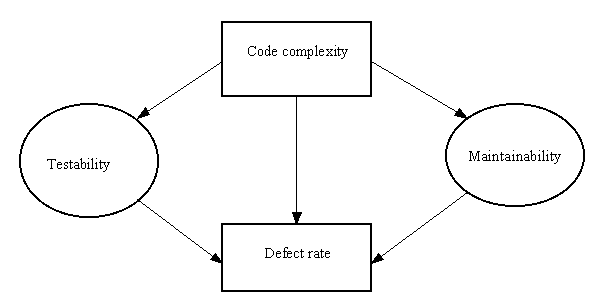
CMT++ helps you to estimate the overall
maintainability of your code base and easily locate the complex parts
of it. You then can assess them separately: put special testing focus
on them or perhaps redesign them. You can use CMT++ also for just
measuring how much code you have: physical lines, comment lines,
program lines, statements. Measuring the whole project code base is no
problem to CMT++.
Here are some quick links to
CMT++ capabilities:
CMT++ facilitates:
- Calculating the basic code complexity
metrics
- McCabe's cyclomatic number (can be
calculated in 4 "flavors": basic, extended (=default), basic_modified, extended_modified)
- Halstead's software science metrics
- Lines of code metrics
- Some other metrics like: number of
semicolons, number of function parameter, depth of control structure nesting
- Calculating Maintainability Index (MI).
- MI is a single number value (or index),
which expresses the relative maintainability of the code
- MI is derived with an arithmetic
formulae from the code's McCabe, Halstead and lines of code
measures.
- The used formulae is widely accepted at
the industry and is defined at various places in the
web.
- Extremely fast processing
- CMT++ can measure many thousand source lines in a
second
- Configurable alarm limits
- If the calculated measure is
outside of the given alarm limits, the measure is flagged in the
report
- Usage in the large
- In one CMT++ session you can analyze a single file, a couple of
files, or your whole code base. Over 1 million lines of code
is no problem to the tool
- Measuring of "unrealted" code files
- Each file is measured independently
of other files. The input files need not make up a
complete compilable project. For example C/C++ code files can be measured
without the header files.
- Measuring non-preprocessed code
- By default CMT++ measures non-preprocessed C/C++
code, i.e. exactly the one that is seen, edited, tested, and that needs
to be maintained
- Independent of the used C/C++/C# compiler
- CMT++ does not use, not even
assume the presence, of a C/C++/C# compiler
- The language recognized
- ANSI C, but the legacy K&R 1 level
functions are not recognized
- ANSI C++, including C++11 standard
level language constructs
- Practically also any other C/C++
dialect can be parsed thanks to CMT++'s novel technique for handling
unknown keywords
-
C#
- Assembly code can be measured
- Lines of code and Halstead measures
- Assembly code input can be embedded in
a C/C++ input file or is a separate assembly file
- The assembly code specialties (source
file extensions, comment character, identifier syntax, etc.) can
be parameterized to the tool for their correct parsing
- Reporting in textual form, in HTML form, in XML form
and in Excel form
- The default textual report is usable
for viewing the measures on the screen and for printing on paper
- The HTML form is a reformatted
representation of the default textual report with
summary/detailed levels, highlighting the alarmed items in red
color, and providing links (if possible to construct) all the
way to the actual C/C++/C# source files.
- The XML report contains all the
measures, summary level information and alarms information in
XML format. With your own xml-utility you can select the
interesting information and process it onwards.
- The Excel report contains the measures in the
format, which can be directly inputted to Excel
- Ease of use
- CMT++ is outmost simple to use already
from the command line
- On Windows platform there is a GUI layer for using
the tool, see more of CMT++ Graphical User
Interface.
- Includes thorough on-line helps, User's
Guide as .pdf, man pages in Unix
- Available on many platforms
CMT++ intended use is:
- Use as a testing tool
- Identifies code sections which are
suspiciously complex and thus more error prone, and which should
be tested more thoroughly. The limited and expensive human
testing resources can be utilized more optimally
- McCabe's cyclomatic number v(G)
gives an estimate for how many test cases at least are needed to
test all paths of a function.
- Halstead's estimated number of bugs B gives a goal
on how many bugs at least the testers should try to find from a source
file.
- Use as a quality assurance tool
- CMT++ Complexity Measures Report as
supplementary material in code reviews
- Maintainability Index (MI) gives a
simple to understand estimate of the relative maintainability of
the code (calculated at function, file and whole code base
levels)
- With consistent use of CMT++, and when the alarms
are assessed and appropriate actions taken, there are far better
changes to come out with more maintainable software
- Enforcing company standards with regard
to accepted code complexity
- Configurable alarm limits
- Measures outside the limits are highlighted in the
report
- Assessing foreign code
- CMT++ gives you a good overall view of the coding
style and maintainability expectations of a set of C/C++/C# files that you
are supposed to take over or your subcontractor is delivering to you.
- Use as a measuring tool
- Simply measure how much code there is
(code/comment/blank lines, semicolons, also assembly code can be
measured)
- Integrate CMT++ use to automated
program builds and collect measures of interest to your own
repository and follow how your overall system complexity and
size has changed over time
- CMT++'s output can be easily processed further by
Excel or by your own XML-based add-on utilities
- Graphical presentations
- More thorough statistical analysis of the
measurements
2. USE OF CMT++
2.1. Command
line mode
The "core component" of
CMT++ is cmt. Its
on-line help for
command-line options is:
Usage:
    cmt [-h] [-H] [-c cnffiles] [-C cnfparam=value]... [-v] [-l[f]]
        [-s] [-w] [-x] [-nxh] [-f filenames] [-o outfile] [srcfiles...]
And it can be used for example as follows:
cmt -o report.txt ..\srcs\*.cpp      (measure these files)
notepad report.txt                   (view the report)
dir /b /s ..\srcs\*.cpp > fnames.lst (names of .cpp files)
dir /b /s ..\srcs\*.h >> fnames.lst  (add names of .h files)
cmt -o report.txt -f fnames.lst      (measure these files)
cmt -l -o report.xml - fnames.lst    (take "long" report, in XML)
myxmlutility -i report.xml           (process onwards...)
cmt -x -o xreport.txt -f fnames.lst  (take Excel form report)
start excel xreport.txt              (start Excel on it)
The default form textual
report can be converted to HTML form with the cmt2html tool. Its
on-line help for command line options is:
Usage:
  cmt2html [-i inputfile] [-o outputdir] [-s sourcedir]...
           [-l splitsize] [-no-html-sources] [-no-javascript]
           [-nsb] [-p prefix]
  cmt2html -h

Command-line options:
  -i inputfile     Input Complexity Measures Report file. Default 'stdin'.
  -o outputdir     Output HTML directory. Default 'CMTHTML'.
  -s sourcedir     Source files are searched also from this directory.
  -l splitsize     Specify number of lines reported per page. Default 1000.
  -no-html-sources Do not convert sources to HTML.
  -no-javascript   Do not generate javascript on HTML pages.
  -p prefix        File name prefix in generated HTML files. Default 'index'.
  -nsb             Do not start HTML browser automatically (only Windows).
  -h               Display command line help.
Start browsing from <outputdir>/<prefix>.html (default CMTHTML/index.html)
And it can be used for
example as follows:
cmt -o report.txt -f fnames.lst      (first normal textual report)
cmt2html -i report.txt -nsb          (convert to HTML and link to the source files)
start CMTHTML\index.html             (start the machine's default browser on the HTML)
2.2. CMT++ GUI
The CMT++ Graphical User Interface
(CMT++ GUI) is supported on Windows. The CMT++ GUI is primarily a
graphical wrapper program for using the core cmt command line tool and
the add-on tools cmt2html and cmt2xml, and for starting the viewer
program on the CMT++ output file.
CMT++ GUI can
be started in many ways. For example, starting the program cmtui.exe
directly from command window, or starting it via Start > Programs
> Testwell CMT++, or the following program icon may have been copied
on the desktop, and clicking on it.

It starts the following program dialog box:
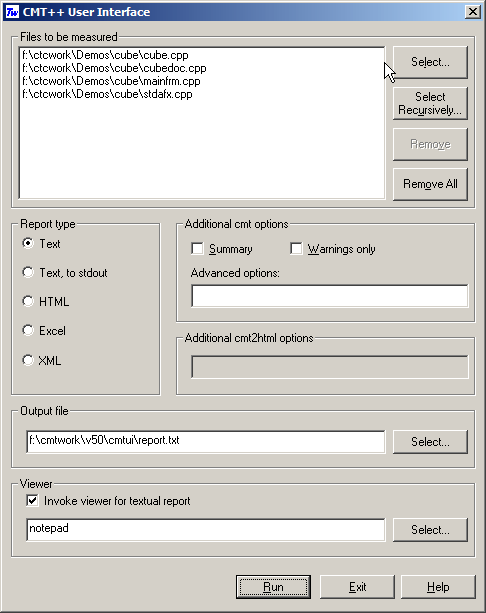
In this dialog box you
can select the files to be measured and fully control how the basic
cmt run is done. You can specify a viewer (eg. notepad or Excel),
which will be started on the generated report. You can also
ask that the CMT++ report is further processed with cmt2html utility
and your default browser can be started on the HTML form
report.
3. CMT++ REPORTS
3.1. Short report
CMT++ calculates many
different measures of the source files. The measures shown in the
short report are perhaps the ones that you'll find most useful. This
report captures in a compact and easy-to-read format the key
complexity measures. The report is convenient to view on the screen
with normal text editors and it suits well to printing on
paper.
Short report contains the following
measures:
- v(G), McCabe cyclomatic
number: control flow complexity.
- LOCphy: how many physical lines the
measured entity has
- LOCpro: how many program lines the
measured entity has
- c%: alarm mark '-' if the commenting
percentage (100 * LOCcom / LOCphy) is outside of the recommended
configuration limits.
- V, Halstead's 'volume': information
content of the entity.
- B, Halstead's 'estimated number of bugs':
how many errors there likely is based on the calculated
complexity.
- MI, Maintainability Index: relative
maintainability rating of the measured entity.
- Summary counts of LOCphy, LOCbl, LOCpro, LOCcom,
number of semicolons, McCabe's v(G) and Maintainability Index over all
measured files.
Example of short report (default form).
Example of same report, of file level summary.
This report type can be further converted to HTML form with cmt2html
tool.
3.2. HTML report
HTML report is worked up from the short report with
cmt2html tool. Technically the HTML report is some number of
generated .html files, which are written
to the specified output directory. The HTML report is a hierarchical (file
summary level, detailed function level) and color-coded (red color is
used to indicate warned items) representation of the CMT++ report. The
resultant HTML representation can be viewed with normal HTML browsers.
If
at the cmt2html time the actual source files were accessible,
html'ized copies of the sources are created to the output directory.
With ctc2html option is is possible to deny the creation of the
html'ized copy of the sources. In such case the source files and
their individual functions are read for display from their original
locations. With some browsers this may not work either because
Javascipts are not allowed or because of some issues how file
extensions are associated to different tools.
The HTML report is an easy to use way to study the complexity of a
large software--at system level, at singe file level, at single
function level, and having the possibility to see the actual source
code, too.
See example of
a HTML report
(started in new window).
3.3. Long report (in XML)
The long report is obtained with cmt option -f (or -lf). It contains
all the
measures that CMT++ calculates. The report form is XML. This report
form is meant to be used in CMT++ integrations to tool
chains. The report can be taken with operand and operator frequencies
(option -lf) or without them (option -l only). The report can be taken
containing function information and file summary information (no -s
option) or to contain only file summary information (-s option).
Example of long report (default form).
Example of same report, of file level
summary and operand/operator frequencies.
3.4. Excel report
The Excel report is obtained with cmt
option -x. It contains the same measures than in short default form
report, either the detailed function level measures only (no -s option)
or the file level summary measures only (-s option). This report can be
inputted to Excel.
Examples of excel report (default form).
Example of same report, of file level summary.
4. OPERATING ENVIRONMENTS
See CMT++
availability for the detailed list of machine / operating system
environments where CMT++ is currently available. The resource requirements of your normal C
or C++ development environment are sufficient for using the CMT++. A C
or C++ compiler is not necessarily needed with CMT++ although CMT++
assumes that the source code it analyzes is correct C or C++.
CMT++ (Complexity Measures Tool for C/C++)
complements the other Testwell testing tools for C and C++, CTA++ (C++ Test Aider) and CTC++ (Test Coverage Analyzer for C/C++)
to a powerful testing toolpack.
Testwell has a similar tool, called CMTJava (Complexity Measures Tool for Java),
for measuring Java code.
|
|